To facilitate data quality and help control for human error, automated validation will be performed against imported data according to specific sets of rules, for example:
- Ensure that the data is of the correct format (e.g.: Tare expressed in number and not text)
- In case of a dropdown field, ensure that the specified value is allowed as an option of the dropdown
- Conditionality: the presence of a field based on another one. (e.g.: ensure that B can be selected only if A was also selected)
- Complex comparison across multiple fields (e.g.: ensure that D > C where A = B)
- Check for duplicates, by ensuring that there isn’t already an asset with a specific data field already in the system, notifying relevant users where duplicates exist
Automated data validation will initially only look at value type errors. For example, if a field requires numeric input and the import file contains letter. As insight is gained, further rules can be added to tighten the process and prevent mistakes.
When the Automated Data Validation tool detects errors the import will be rejected and the importer will land on a screen listing the errors in the import file. See image below for example:
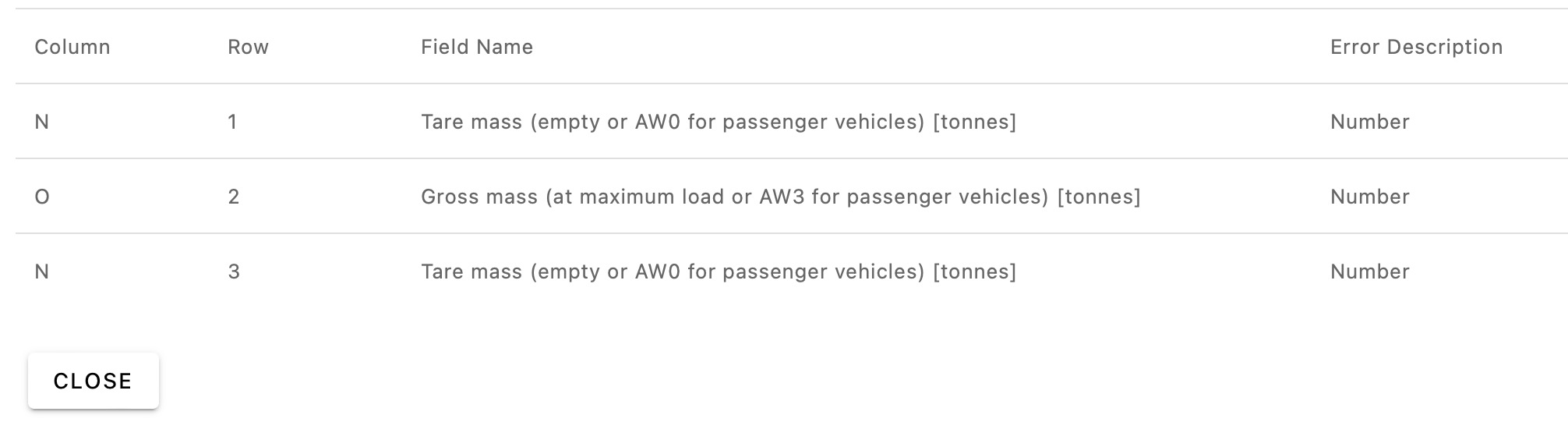
The import file needs to be amended with value errors fixed, and re-imported.
Go to next step: List Field Value Mapping
Was this article helpful?
That’s Great!
Thank you for your feedback
Sorry! We couldn't be helpful
Thank you for your feedback
Feedback sent
We appreciate your effort and will try to fix the article