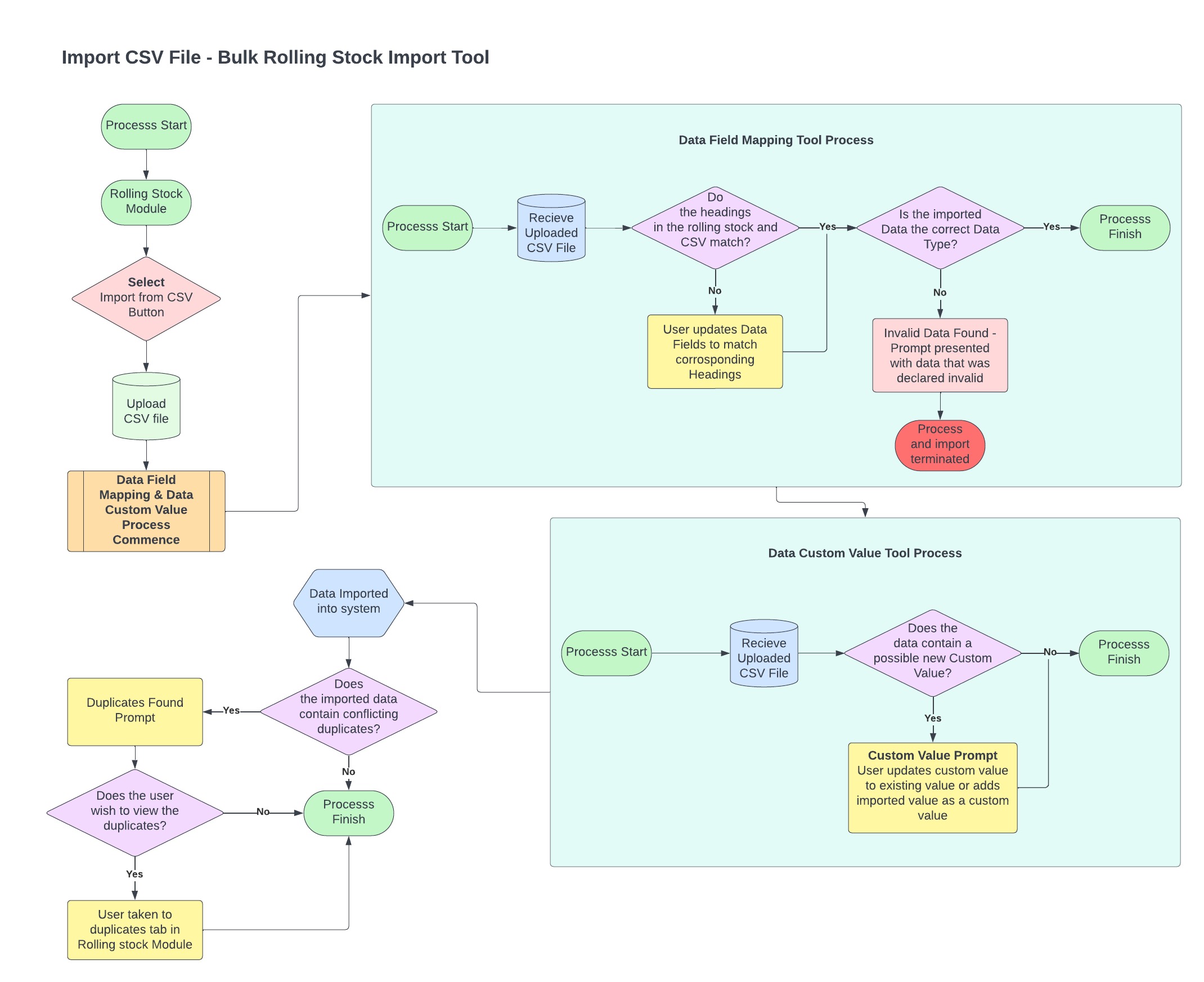
The CSV data import tool is only available to logged in users with super admin permissions. Import of a data set will trigger a workflow of steps using other NRSR system tools to ensure integrity of the imported data set.
Steps in the import process
- Cleanse and Organise Data
- Import CSV
- Field Mapping
- Automated Data Validation
- List Field Mapping
- Merge Duplicate Rolling Stock
- Rolling Stock Verification
The process begins pre-import to cleanse and organise existing data sets in preparation for import. From there the NRSR System Tools will help facilitate data validation and mapping to the NRSR data model.
Go to next step: Cleanse & Organise Data
Click on the image below to enlarge the process flow diagram for the rolling stock data import process
Was this article helpful?
That’s Great!
Thank you for your feedback
Sorry! We couldn't be helpful
Thank you for your feedback
Feedback sent
We appreciate your effort and will try to fix the article